Legionnaires are players who are members of other clans or don’t have a clan at all, and can be invited into a detachment for Skirmishes or Advances.
If you want to play with friends who are not in your clan, you can invite them to the detachment as legionnaires. Your clan can also fall back on legionnaires if it lacks clansmen to form a detachment. Moreover, if your clan is not engaged in battles at the moment, or you do not have a clan, you can become a legionnaire and join any open detachment.
Inviting Players to the Detachment
Any clan member in the detachment can invite a legionnaire to join it.
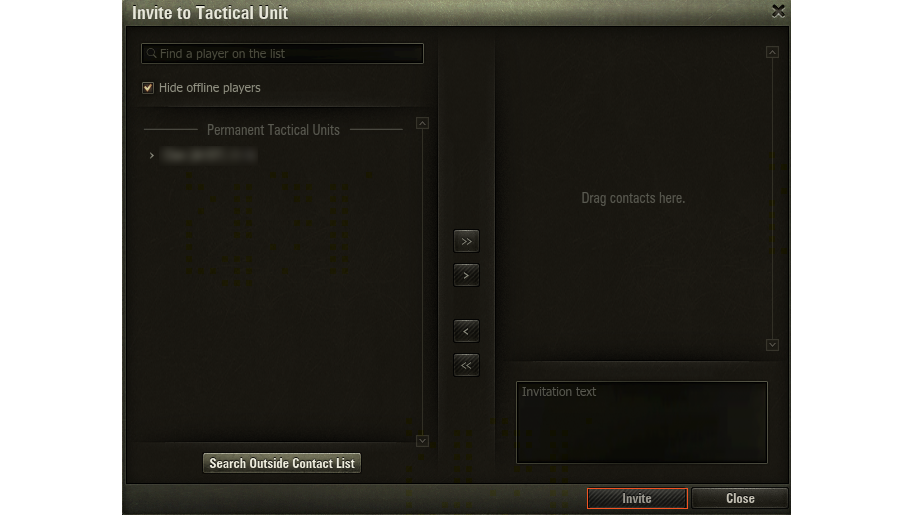
To invite a legionnaire:
- Click Invite Players in the Skirmish or Advance window.
- In the Invite to Tactical Unit window, select a player and drag them to the field on the right. If the player is not on the list, find them via the search bar.
- Type a message (optional) and click Invite.
When legionnaires join the detachment, they can perform the same actions as any regular clansman: select a vehicle, confirm they are ready for battle, or leave the detachment. Legionnaires cannot, however, take command over the detachment.
The maximum number of legionnaires in the detachment is determined by the battle mode and division. For more information see Advances and Skirmishes.
Joining a Detachment as a Legionnaire
Whether you are a clan member or not, you can take part in other clans’ Skirmishes and Advances as a legionnaire. You can join any open detachment via the Detachment List.

The ways to join a detachment via the Detachment List differ slightly, depending on whether you are a clan member or not.
- YOU ARE A CLAN MEMBER
- YOU ARE NOT A CLAN MEMBER
To join another clan’s open detachment as a legionnaire:
- Go to the CLANS tab in the Garage. The CLANS IN WORLD OF TANKS screen appears.
- In the lower part of the screen, click Fight as a legionnaire. The Stronghold: Battles window appears.
- In this window, go to the DETACHMENT LIST tab and select a battle mode and a Division. A list of all open detachments appears.
- Click the required detachment and click Join Detachment in the lower right part of the window.
Your name will be displayed in the Volunteers list. Wait until the Detachment Commander adds you to the detachment.

